Greenstep Hub SSO instructions with Microsoft Entra ID
Last updated About 1 year ago
Here is the suggested simple approach for you to set up SSO with Greenstep Hub:
Go to hub.greenstep.com and click to log in with Microsoft authentication with you account (Entra ID global admin account)
You will get this kind of screen. When you click “Accept”, the enterprise application “Greenstep Hub (production)” will be created automatically.
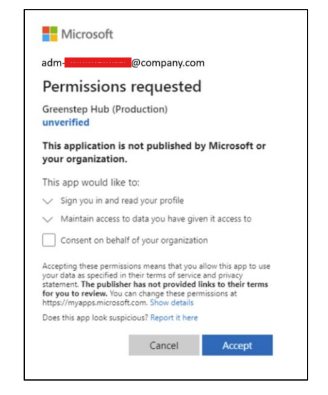
You can either
choose to click “consent on behalf of your organization” to allow any user to try to log in to Greenstep Hub with your Microsoft credentials, or
In Entra ID, in the “Greenstep Hub (production)” application choose to control which users or groups are allowed the log in. This will be sufficient to establish SSO used with Microsoft account. No other activities are needed, as there will not be other information flowing between your company and Greenstep Hub except the user email address and name through the Microsoft authentication.
Was this helpful?